How to Check Keyword Position on Google
How do you check keyword position on Google?
To check a keyword position on Google, remove personalization: use a free rank checker for a quick neutral reading, Google Search Console for averages from real searches, or rank tracking software for daily history. A normal search in your browser is least reliable.
Quick verdict: Use the free checker for a quick neutral reading, Search Console for every keyword over time, and Pro once you track many sites daily.
Price tier: Free, with a paid upgrade
Run a free checkMethod 1: search manually (quick, but biased)
Open a private or incognito window in Chrome, sign out of Google, search the keyword and count the organic results until you find your domain. Skip ads, the map pack and other boxes, because rank positions count organic listings only.
This works for one keyword, but your location, language and device still shape the results, and counting past page two is slow.
Method 2: use a free keyword position checker
A free keyword position checker requests Google results for you and scans them for your domain. Our checker takes a keyword, domain and country, then returns your top 100 desktop position, the ranking URL and the ten leading pages, with 3 daily checks.
With our free Google rank checker you enter the keyword, your domain and a country.
You get 3 checks per day without an account.
Method 3: Google Search Console
Google Search Console shows average position for every query where your site appeared. Open Performance, then Search results, and turn on Average position. The data comes from real searches but blends countries, devices and days, so it rarely matches one check.
The Queries tab lists every search where your site appeared, with clicks, impressions and position.
Our guide to what average position measures explains the gap.
Method 4: rank tracking software
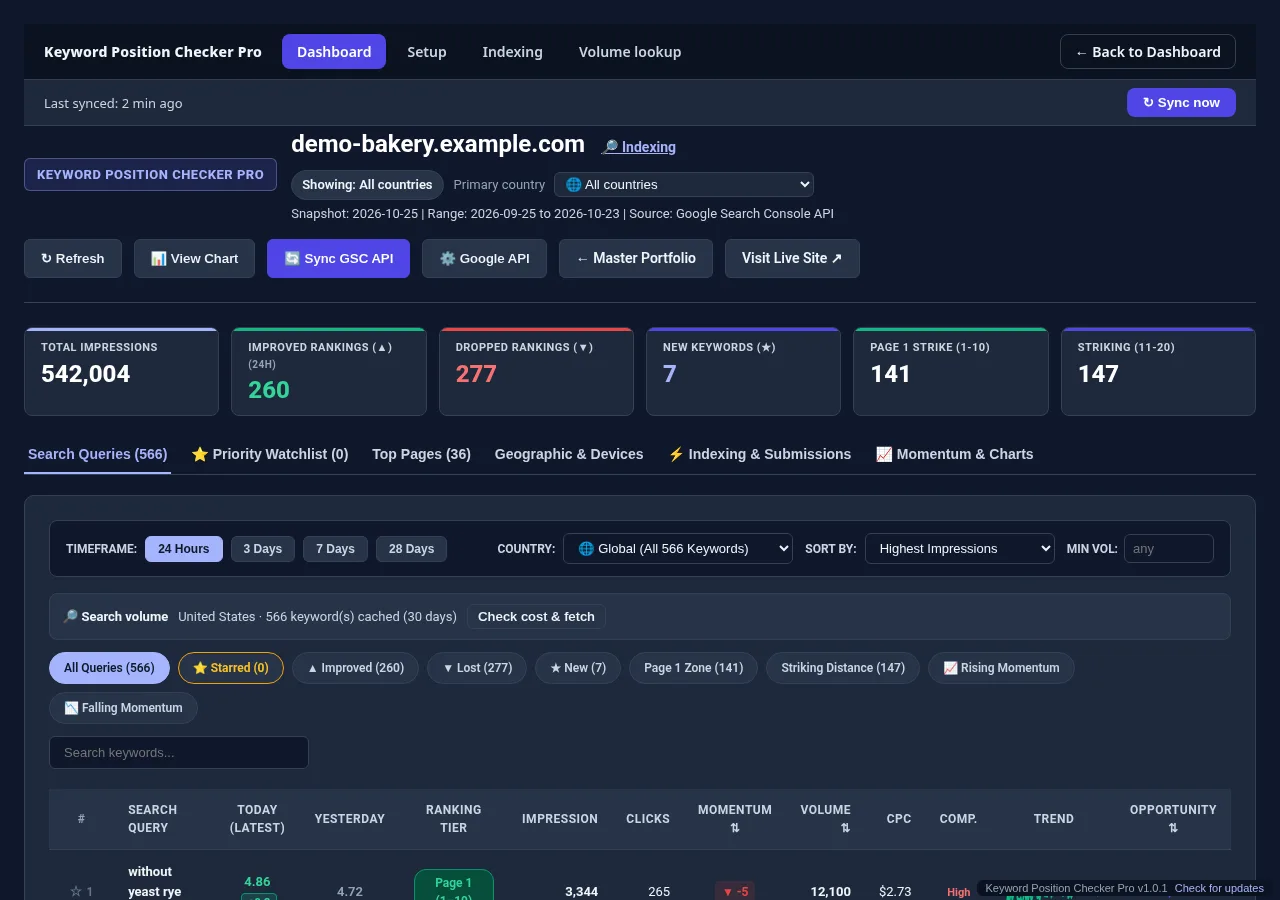
Rank tracking software records positions every day, so you see trends instead of snapshots. It suits many keywords or several sites. Keyword Position Checker Pro pulls every Search Console query across all your sites and accounts and highlights rising and falling keywords.
When you care about many keywords or several sites, checking by hand stops scaling.
Keyword Position Checker Pro pulls positions for every query in Search Console across all your sites and Google accounts, and highlights which ones are rising or falling.
The keyword table shows daily changes.
Checking in Chrome
Chrome extensions number the results on Google's page, but they read the page your browser received. That page carries your location and personalization, so extension positions are a rough guide. Use an incognito window, or confirm important keywords with a neutral checker.
Chrome extensions that show positions inside the results page exist, but they read the page your browser received, so they inherit your personalization. Use incognito, or treat their numbers as a rough guide.
Checking on a phone
Checking a ranking on a phone needs extra care, because mobile results can differ from desktop and the Google app adds its own personalization. A private browser tab or a web-based checker gives a cleaner mobile reading than the signed-in Google app.
See how to check positions on Android and iPhone.
Other ways and other engines
Beyond the four main methods, developers automate rank checks through APIs, and site owners check Bing and Yahoo separately. When two methods report different numbers for one keyword, location, device, timing and averaging usually explain the gap between those two numbers.
- To automate checks in code, read the keyword position API guide.
- For Microsoft's engines, see Bing and Yahoo rankings.
- If two methods give different numbers, this explains why rankings look different.
Common mistakes
Four mistakes produce wrong keyword positions: searching from your own signed-in browser, checking the wrong country, counting ads and map listings as organic results, and comparing one live check with a Search Console average that blends every market and device.
- Searching signed in, which flatters sites you visit often.
- Checking from home when customers search in another country.
- Counting ads, maps and other boxes as positions.
- Comparing a live check with a 28-day Search Console average.
Beginners vs agencies
Beginners need a free neutral check and Search Console, which cover a few keywords well. Agencies need every keyword across many client sites with history, so a tracker that syncs Search Console or a paid suite saves hours of manual checking each week.
- Beginners: the free checker plus weekly Search Console reviews.
- Freelancers: Search Console plus a tracker for key client terms.
- Agencies: daily tracking across all sites, such as Pro for many client sites.
Check one keyword now, or track all of them.
Run a free check with the Keyword Position Checker (3 per day, no sign-up). To follow every keyword on every site each day, see Keyword Position Checker & Tracker Pro for Windows.
Early bird: $299 with code EARLYBIRD for the first 50 buyers (regular price $499). One-time payment, 3 PCs.