Bulk Keyword Position Checker: How to Check Multiple Keywords at Once
How do you check multiple keyword positions at once?
To check many keyword positions at once, export your queries from Google Search Console, run a SERP API script, or use rank tracking software. Our free checker handles one keyword per check, and the Pro desktop app is our bulk option.
Quick verdict: Use Search Console exports for occasional lists and Pro for daily tracking of every keyword on many sites.
Price tier: Free to $499 one-time
Get Pro on GumroadOur free tool on the home page checks one keyword at a time, 3 checks per day. It is not a bulk checker. The options that follow are the realistic ways to check a long list.
Option 1: export from Search Console (free)
A Search Console export is the free bulk option for your own site. The Queries report lists every search where your pages appeared, with position, clicks and impressions. It covers thousands of keywords, but it shows averages and omits keywords without impressions.
In Search Console, open Performance, show Average position, switch to the Queries tab and use Export. You get every query where your site appeared, with position, clicks and impressions, as a spreadsheet.
It is free and covers thousands of keywords, but it shows averages over the date range and leaves out keywords you do not rank for yet.
Option 2: multi-keyword web checkers
Multi-keyword web checkers accept several keywords per run, one per line, usually with a small cap per check and captchas between runs. They suit an occasional list of ten or twenty terms, but they become slow and repetitive for hundreds of keywords.
See how one popular tool compares on our Small SEO Tools alternative page.
Option 3: spreadsheet tools
Spreadsheet rank checkers run position checks for a column of keywords inside Google Sheets, through add-ons or template sheets. They suit people who already report in spreadsheets. Larger keyword allowances usually come with monthly subscription plans rather than a one-time price.
They are handy if you already live in spreadsheets, though the larger plans are usually monthly subscriptions.
Option 4: a SERP API script
A SERP API script loops through a keyword list and requests live Google results for each term, then finds your domain in the response. Developers pay per request. The method works for any domain, including competitors, and scales as far as your budget allows.
It is flexible and works for any domain. Our API guide includes a PHP example.
Option 5: rank tracking software
Keyword Position Checker Pro is built for this job. Instead of pasting a list, it pulls every query from Search Console for each site and shows the position, the change since yesterday, clicks, impressions and momentum in one sortable table.
That covers hundreds or thousands of keywords per site, across unlimited sites and Google accounts, every day.
The keyword table shows daily changes.
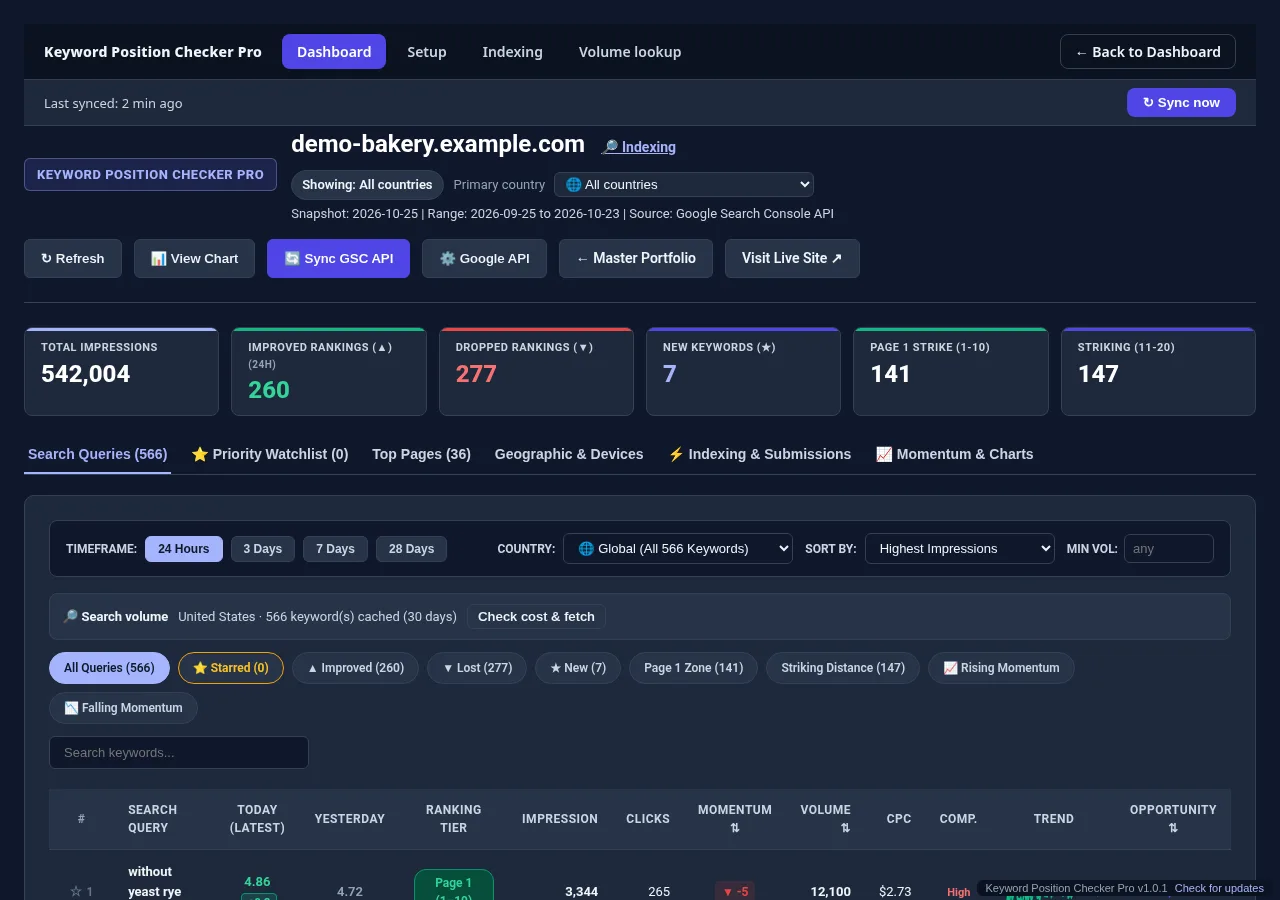
One limit to know: because Pro reads Search Console, it shows keywords where your site already gets impressions. For brand new pages with no impressions yet, use a live checker or a SERP API for those few terms.
Which option fits?
The right bulk method depends on the job. A Search Console export suits a one-off audit of your own site, a multi-keyword web checker suits a short list, a SERP API suits automation, and desktop rank tracking suits every keyword on many sites daily.
| Need | Best fit |
|---|---|
| A one-off look at your own site's keywords | Search Console export |
| Ten or so keywords on any domain, today | Multi-keyword web checker |
| Automation in your own code | SERP API |
| Every keyword on many sites, every day, with history | Rank tracking software such as Pro |
If you are not sure you need ongoing tracking, read when a one-off check is not enough, or see how tools stack up in our checker comparison.
Beginners vs agencies
Beginners with a short keyword list can use Search Console exports or a free multi-keyword tool. Agencies with hundreds of keywords across client sites need automatic syncing and history, because pasting lists into free tools every week does not scale.
- Beginners: Search Console export to a spreadsheet.
- Growing sites: a free list tool for occasional audits.
- Agencies: automatic daily sync across all client sites.
Check one keyword now, or track all of them.
Run a free check with the Keyword Position Checker (3 per day, no sign-up). To follow every keyword on every site each day, see Keyword Position Checker & Tracker Pro for Windows.
Early bird: $299 with code EARLYBIRD for the first 50 buyers (regular price $499). One-time payment, 3 PCs.